
PP OfficeDocPrintAlways free
Template LibraryBlogHelp & Feedback
  1. Home/
  2. Template Library/
  3. Free Printable Class Timetable Template - Online Schedule Maker

Free Printable Class Timetable Template - Online Schedule Maker

What is a Class Timetable Template?

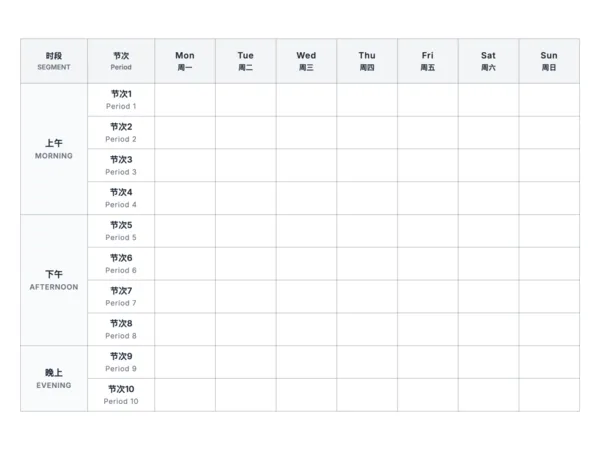
A class timetable template is a visual grid used to plan and display a daily or weekly schedule of classes. It clearly lists course names, teachers, and classrooms for different time slots, helping students and educators easily keep track of the academic rhythm and manage their study and break times effectively. It's an essential tool for organized school life.

Who is it for?

  • Students of all levels (from elementary to university) who need a clear overview of their daily classes.
  • Teachers and educators who need to manage teaching plans for multiple classes.
  • Parents who want to help their children develop good time management habits.
  • Professionals and learners attending various training courses or hobby classes.

How to Use the Class Timetable Template?

  1. Set Time Slots: Customize the number of sessions for morning, afternoon, and evening according to your school's schedule.
  2. Fill in Courses: Enter the information for each subject from Monday to Sunday in the generated table.
  3. Personalize: Adjust the row height and label width to fit your content length and layout preferences.
  4. Print and Use: Print the timetable and post it on your desk, or save a digital version to check on your phone or computer anytime.

Application Scenarios

  • New Semester Planning: At the beginning of a semester, fill in all your courses to get a clear overview of your academic workload.
  • Home Study Corner: Parents can create a comprehensive schedule for their children that includes both school classes and homework time.
  • Managing Hobby Classes: Consolidate various activities like piano, drawing, or swimming lessons into one schedule to avoid time conflicts.
  • Exam Revision Planning: During exam periods, adapt the timetable into a revision schedule to allocate study time for each subject effectively.

FAQ

Yes, you can configure the number of sessions for Morning, Afternoon, and Evening separately to match your specific school schedule.
Yes, you can toggle the 'Language' setting to 'Both' to display days and periods in both English and Chinese, or stick to one language if you prefer.
A4 Landscape is the standard choice for timetables as it provides enough width for all weekdays. A5 is great for pasting into notebooks.
Yes, the 'Font Size' slider allows you to adjust the text size to ensure legibility, especially when you have many periods.

Related Templates

Timeline Daily Planner
Daily Planner (Journal Style)
Daily To-Do List
Daily To-Do List
Minimal Journal
Minimal Journal

Export

Settings
Quick Settings

Recommended Setup

Recommended Setup

For general use, we recommend using default settings on A4 paper. This provides the best balance between usability and print quality.

Adjust the parameters in the control panel to match your specific needs. All settings can be customized in real-time.

Printing Tips

Printing Tips

Paper Selection: For best results, use standard 80-100 gsm copy paper.

Print Quality: Set your printer to 300 DPI or 'High Quality' mode for crisp output.

Test Print: Always print a single test page first to verify settings before printing multiple copies.
OfficeDocPrint

OfficeDocPrint

Printable templates for classrooms, studios, and daily planners.

Product

  • Template Library
  • Changelog
  • OfficeDocPrint Main Site

Resources

  • About Us
  • Help & Feedback

Printable templates for classrooms, studios, and daily planners.

OfficeDocPrint - Privacy PolicyOfficeDocPrint - Terms of Service
© 2025 OfficeDocPrint. All rights reserved.