
PP OfficeDocPrintAlways free
Template LibraryBlogHelp & Feedback
  1. Home/
  2. Template Library/
  3. Free Printable Daily To-Do List Template - Efficient Task & Time Management

Free Printable Daily To-Do List Template - Efficient Task & Time Management

What is a Daily To-Do List Template?

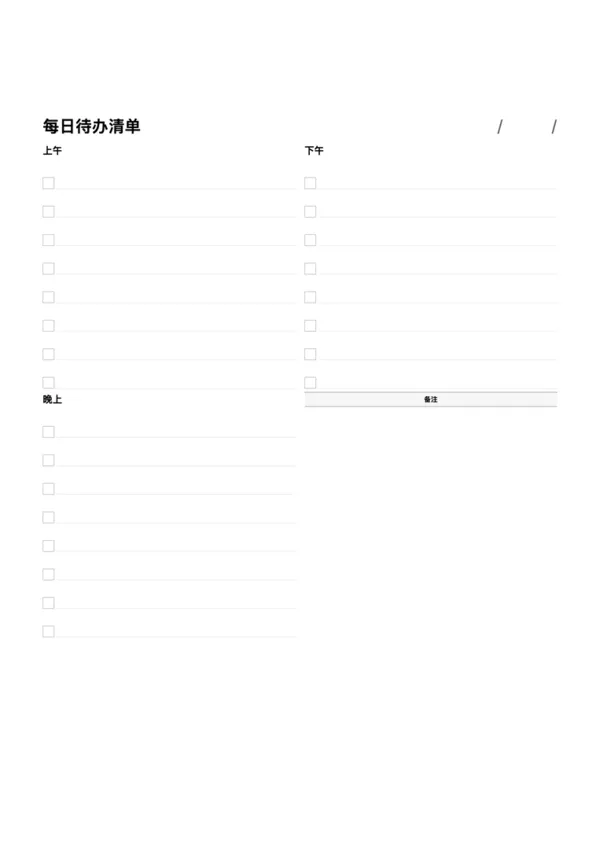
A daily to-do list template is a simple yet powerful time management tool that systematically organizes your work and life tasks for the day. By listing tasks with checkboxes, users can clearly track their progress and ensure that important items are not missed. Dividing the day into morning, afternoon, and evening helps to allocate energy wisely and adds a better rhythm to your planning.

Who is it for?

  • Professionals wanting to efficiently manage work tasks and meeting schedules.
  • Students who need to balance classes, homework, and extracurricular activities.
  • Individuals aiming to build good habits like fitness or reading.
  • Homemakers who need to plan family shopping, chores, and schedules.

How to Use the Daily To-Do List Template?

  1. List Your Tasks: At the beginning of the day, fill in all the tasks you need to complete in the morning, afternoon, and evening sections.
  2. Set Priorities: Mark important or urgent tasks (e.g., with an asterisk).
  3. Complete One by One: Check off tasks in the checkbox as you complete them for an immediate sense of accomplishment.
  4. Jot Down Notes: Use the 'Notes' area in the bottom right to capture sudden ideas or items to be handled later.
  5. Review Daily: At the end of the day, review completed and uncompleted tasks to prepare for the next day's plan.

Application Scenarios

  • Workday Planning: Clearly schedule your daily workflow to ensure project progress.
  • Study Schedule: Break down a day's study tasks into different time slots, balancing work and rest.
  • Habit Tracking: Persist in completing specific tasks daily, such as 'read for 30 minutes' or 'exercise for 1 hour'.
  • Event Planning: For events like parties or trips, list all the preparation and execution steps.

FAQ

Yes, the layout features two distinct sections. You can use them for 'Work/Personal', 'Morning/Afternoon', or any other categorization you need.
Yes, the clean lines and checkboxes fit perfectly into a minimalist bullet journal system, especially when printed on A5 paper.
The number of items is adjustable via the 'Items per Section' setting. You can maximize it for long lists or reduce it for a focused daily plan.
The current version has a standard header. In future updates, we plan to add custom title editing capabilities.

Related Templates

Lunar Task Calendar
Lunar Task Calendar
Daily Planner (Journal Style)
Class Timetable
Class Timetable
Minimal Journal
Minimal Journal

Export

Settings
Quick Settings

Recommended Setup

Recommended Setup

For general use, we recommend using default settings on A4 paper. This provides the best balance between usability and print quality.

Adjust the parameters in the control panel to match your specific needs. All settings can be customized in real-time.

Printing Tips

Printing Tips

Paper Selection: For best results, use standard 80-100 gsm copy paper.

Print Quality: Set your printer to 300 DPI or 'High Quality' mode for crisp output.

Test Print: Always print a single test page first to verify settings before printing multiple copies.
OfficeDocPrint

OfficeDocPrint

Printable templates for classrooms, studios, and daily planners.

Product

  • Template Library
  • Changelog
  • OfficeDocPrint Main Site

Resources

  • About Us
  • Help & Feedback

Printable templates for classrooms, studios, and daily planners.

OfficeDocPrint - Privacy PolicyOfficeDocPrint - Terms of Service
© 2025 OfficeDocPrint. All rights reserved.